
Download DeepMaker AI Tattoo Generator – Instant Custom Tattoo Designs, AI‑Powered Tool
Introduction
In the fast‑moving world of body art, ideas can spark in a heartbeat, yet turning those sparks into a polished design often consumes hours of sketching, research, and client iteration. DeepMaker AI Tattoo Generator changes that equation by putting a powerful, cloud‑based design engine directly in the browser. Whether you’re a first‑time ink enthusiast trying to visualise a personal symbol, a seasoned collector looking for the next bold statement, or a professional tattoo studio that needs to accelerate client consultations, this tool delivers high‑resolution, placement‑aware concepts in seconds.
The platform blends deep‑learning models trained on thousands of tattoo photographs with an intuitive natural‑language prompt system, allowing users to describe a concept in plain English (or any of the supported languages) and instantly receive multiple style variations. Because it runs entirely online, there is no heavy software to install, no operating‑system constraints, and updates happen automatically on the server side. This introductory section outlines why DeepMaker stands out, what problems it solves, and how it fits into the modern tattoo workflow, setting the stage for a deeper dive into its core capabilities.
Overview and Core Features
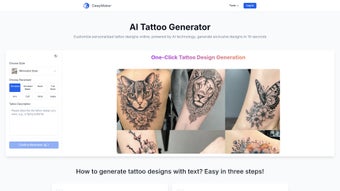
DeepMaker AI Tattoo Generator is a web‑based creative studio that leverages cutting‑edge artificial intelligence to produce high‑resolution tattoo concepts in seconds. The platform accepts plain‑language prompts, lets users select from a rich style library, and offers a realistic placement preview that automatically adapts to body curvature. All designs are generated in the cloud, stored securely for 30 days, and can be exported in print‑ready formats. The combination of speed, flexibility, and visual fidelity positions DeepMaker as a unique bridge between imagination and ink, turning vague concepts into polished, ready‑to‑share artwork with a single click.
- AI‑Driven Design Engine: Uses deep learning models trained on thousands of tattoo images to understand style nuances and body‑placement geometry.
- Extensive Style Library: Minimalist, realistic, Japanese, watercolor, neo‑traditional, and more, each with adjustable intensity sliders.
- Placement Preview: Upload a photo or choose a template to see how the design wraps around muscles, curves, and contours.
- High‑Resolution Export: Download PNG, SVG, or PDF at 300 DPI or higher for printing, client presentations, or studio portfolios.
- Multi‑Language Support: Interface available in English, Spanish, French, Japanese, German, Chinese, with auto‑translation of prompts.
- Instant Generation: Typical turnaround is 5‑10 seconds per design, enabling rapid iteration during consultations.
- Collaboration Toolkit: Share a secure link, collect feedback, and refine concepts in real time.
- Secure Cloud Storage: Projects are encrypted in transit (TLS 1.3) and at rest, saved for 30 days with optional export to personal drives.
- Free Tier & Premium Upgrade: Generate up to three designs per day for free; paid plans unlock unlimited renders, batch exports, and priority processing.
Installation, Usage Guide & Compatibility
DeepMaker AI Tattoo Generator is a pure web application, which means there is no traditional installation process. Users simply navigate to deepmaker.ai, create a free account, and start designing. The platform is built with responsive HTML5, CSS3, and WebGL technologies, ensuring smooth operation across desktop and mobile browsers.
Step‑by‑Step Usage Guide
- Create an Account: Sign up with an email address or social login (Google, Apple, Facebook). Verification is completed within minutes.
- Define Your Concept: In the “Prompt” field, type a concise description—e.g., “a minimalist compass on the inner forearm, thin line, black ink.”
- Select a Style: Choose from the style dropdown. Each style includes a preview gallery to help you visualize the aesthetic.
- Specify Placement: Upload a photo of the target body part or select a template (arm, back, chest, leg). The AI automatically scales the design to fit the curvature.
- Generate & Refine: Click “Generate.” The AI returns 3‑5 variations. Use the “Refine” slider to adjust detail, line weight, or color intensity.
- Export: When satisfied, click “Download.” Choose PNG for raster, SVG for vector, or PDF for print‑ready files.
- Share (Optional): Use the “Share Link” feature to send a secure URL to clients, allowing them to comment directly on the design.
Compatibility: Because DeepMaker runs in the browser, it works on any modern operating system that supports Chrome, Edge, Firefox, or Safari—including Windows 10/11, macOS Ventura and later, Linux distributions, as well as Android 12+ and iOS 15+. The responsive UI adapts to tablets and smartphones, though the full placement‑preview tools are best experienced on a desktop or laptop with a larger screen.
Pros, Cons, Frequently Asked Questions & Final Verdict
Pros
- Lightning‑fast AI generation eliminates hours of manual sketching.
- Wide style spectrum satisfies both traditional and avant‑garde tastes.
- Placement preview reduces the risk of poorly scaled tattoos.
- No software download; works on any device with a modern browser.
- Free tier allows casual users to test the service before committing.
- Secure cloud storage protects client confidentiality.
Cons
- Free tier limits daily renders, which may frustrate power users.
- Highly detailed realistic styles sometimes need manual tweaking by a skilled artist.
- Internet connection required; offline use is not possible.
- Export options are limited to PNG, SVG, and PDF—no native PSD or AI files.
Frequently Asked Questions
Is DeepMaker AI Tattoo Generator truly free?
Yes, there is a free tier that lets you generate up to three designs per day. For unlimited access, a premium subscription starting at $9.99 / month is available.
Can I use the generated designs for commercial purposes?
Premium subscribers receive a commercial‑use license, allowing them to sell designs, print merchandise, or use the artwork in marketing materials. Free‑tier users may only use the images for personal, non‑commercial purposes.
How secure is my data on DeepMaker?
All projects are encrypted in transit (TLS 1.3) and at rest. Files are stored for 30 days and are automatically deleted unless you export them. The platform complies with GDPR and CCPA standards.
Do I need any artistic skills to get good results?
No. The AI interprets plain‑language prompts, so you can describe an idea in everyday terms. However, having a basic sense of style preferences helps you fine‑tune the results.
What browsers are recommended for optimal performance?
Google Chrome (latest), Microsoft Edge, Mozilla Firefox, and Apple Safari (all recent versions) provide full functionality. Older browsers may struggle with the WebGL‑based preview.
Conclusion & Call to Action
DeepMaker AI Tattoo Generator reshapes the way both hobbyists and professionals approach tattoo ideation. By condensing what used to be a multi‑hour brainstorming session into a few seconds of AI‑driven creativity, it empowers users to experiment without commitment, accelerates client communication, and supplies high‑quality assets for marketing or merch. While the free tier’s daily limit may nudge power users toward a paid plan, the overall value—especially for studios seeking faster turnaround—justifies the modest subscription fee. If you’re ready to explore limitless ink possibilities, download DeepMaker AI Tattoo Generator today and start turning your imagination into skin‑deep art.



.png)



